
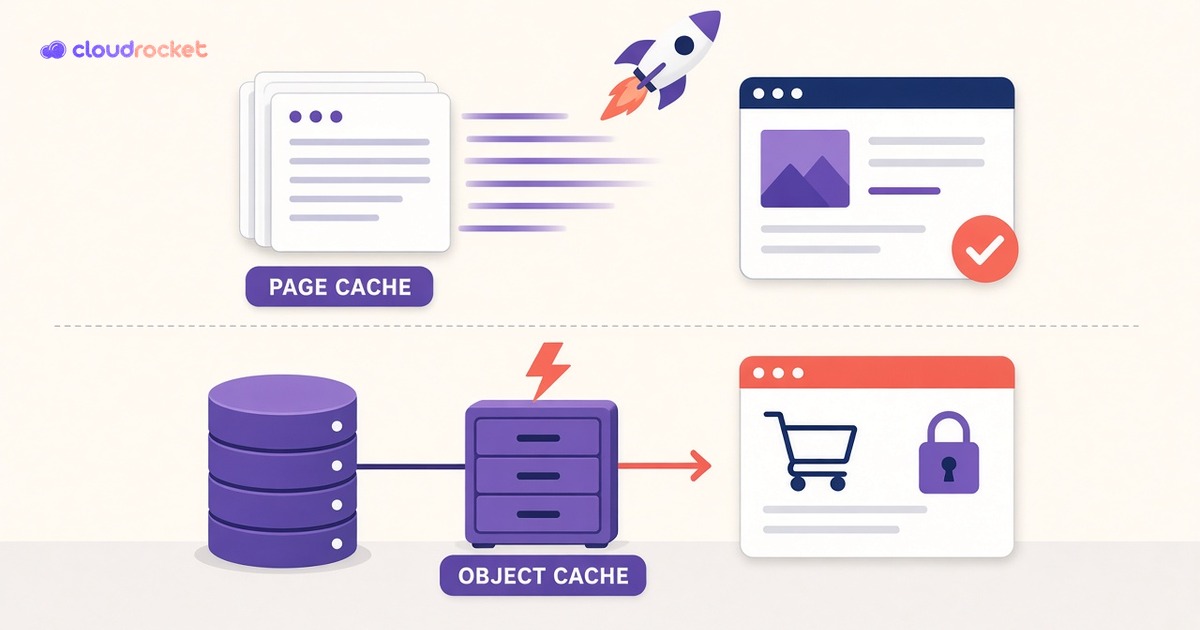
Page cache vs object cache in WordPress: what each one actually speeds up
"We already have caching" is one of the most common things I hear when a client says their WordPress site is slow. Usually they're right: there is a cache. It's just not the one that helps the pages they're complaining about. Page cache and object cache solve two different problems, and most slow logged-in WordPress sites have the first one and not the second.
Here's how I explain the difference, and what I check on every site we manage.
What page cache does
Without caching, every visit to a WordPress page runs PHP, loads plugins and the theme, asks the database dozens or hundreds of questions, and builds the HTML from scratch. Page cache saves the finished HTML the first time a page is built and hands that saved copy to the next visitors. No PHP, no database, just a file or a memory lookup. That's why a cached homepage can load in a fraction of a second.
Page cache can live in a plugin, in the server (Nginx or LiteSpeed cache, for example), or at a CDN. Wherever it lives, the idea is the same: one page built once, served many times to people who all see the same thing.
What page cache can't help
Page cache only works when every visitor should see the same HTML. As soon as a page is personal, it has to be built fresh. That includes:
Logged-in users, including editors, members and customers with accounts.
Cart, checkout and My Account on WooCommerce, which are excluded from page cache on purpose.
wp-admin, where every screen is built for the person looking at it.
Form submissions, search results and AJAX requests, which change with every request.
On a brochure site, that's a small share of traffic. On a store, a membership site or an online course, it's often the traffic that matters most. Those pages go straight through to PHP and the database every time, no matter how good the page cache is.
What object cache does
WordPress already has an object cache built in, but by default it only lasts for a single request. When the page is done, everything it learned is thrown away, and the next request asks the database the same questions again.
A persistent object cache keeps those answers in memory between requests, usually in Redis or Memcached, connected through an object-cache.php drop-in. Options, menus, product data, user data and query results that were looked up a moment ago come back from memory instead of the database. It doesn't skip building the page, it makes building the page cheaper. That's exactly what logged-in pages, cart, checkout and wp-admin need.
When object cache makes a real difference
The biggest gains I see are on WooCommerce stores, membership and course sites, busy multi-author blogs, and any site where editors spend their day in wp-admin. A small brochure site with good page cache and few logged-in users will notice much less, and that's fine. It's a tool for a specific problem, not a badge.
How to check what you actually have
Test logged in, not just in an incognito window. Speed tests hit the cached version. Log in as a customer, add something to the cart, open checkout, and time it. Then do the same in wp-admin.
Look at Site Health. Since WordPress 6.1, Tools → Site Health can recommend a persistent object cache when it thinks your site would benefit. If it's showing that recommendation, you don't have one running.
Confirm the object cache is really connected. A Redis plugin that's installed but not enabled, or a drop-in that can't reach the Redis server, quietly falls back to the default per-request cache. Check the plugin's status screen or run wp cache type with WP-CLI.
Watch the hit ratio and memory. If Redis is constantly running out of memory and throwing entries away, the hit ratio drops and you lose most of the benefit.
Two things that bite people
Stale data after direct database changes. If someone edits the database directly or imports data outside WordPress, the object cache can keep serving the old values. Flush the object cache after any change made outside WordPress.
Several sites sharing one Redis. If two WordPress sites point at the same Redis instance without a unique key prefix or separate database, they can read each other's cached data. Give every site its own prefix (WP_CACHE_KEY_SALT or the plugin's equivalent) or its own Redis database.
A short checklist you can copy
Page cache on for anonymous pages, with cart, checkout and My Account excluded.
Persistent object cache (Redis or Memcached) for stores, members and busy admins.
Logged-in speed test on cart, checkout and wp-admin, not just the homepage.
Connection confirmed in the plugin status or with wp cache type.
Hit ratio and memory checked, so the cache isn't evicting itself.
Unique key prefix per site, and a flush after any change made outside WordPress.
If your homepage is fast and your customers still say the site is slow, believe them. They're probably logged in, and they're on the pages page cache was never going to help.
Ready to put this into practice? Explore CloudRocket hosting, lock down your site with WordPress protection, or run a free website audit.
FAQ
What is the difference between page cache and object cache in WordPress?
Page cache stores finished HTML pages and serves them without running WordPress. Object cache stores the results of database lookups in memory, so pages that must be built fresh are built faster.
Why is my WooCommerce cart slow when my homepage is fast?
Cart, checkout and My Account are excluded from page cache because they're personal, so they're built from scratch on every request. A persistent object cache usually helps those pages most.
Do I need Redis for a small WordPress site?
Not always. A brochure site with few logged-in users gets most of its speed from page cache. Object cache matters most for stores, membership sites and teams working in wp-admin all day.
How do I know if my persistent object cache is working?
Check your Redis or object-cache plugin's status screen, run wp cache type with WP-CLI, and see whether Site Health still recommends a persistent object cache.